共计 2986 个字符,预计需要花费 8 分钟才能阅读完成。
Vuex 概述
一、组件之间共享数据的方式
父向子传值: v-bind 属性绑定
子向父传值: v-on 事件绑定
兄弟姐妹之间共享数据: EventBus
- $on 接收数据的组件
- $emit 发送数据的那个组件
二、Vuex 是什么
Vuex 是实现组件全局状态(数据)管理的一种机制,可以方便的实现组件之间的数据共享。
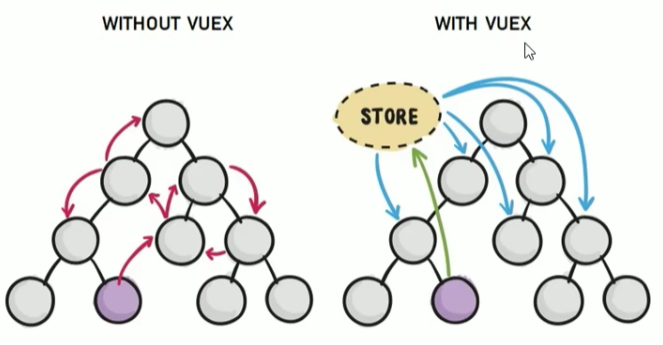
三、使用 Vuex 统一管理状态的好处
- 能够在 vuex 中集中管理共享的数据,易于开发和后期维护
- 能够高效的实现组件之间的数据共享,提高开发效率
- 存储在 vuex 中的数据都是响应式的,能够实时保持数据与页面的同步
四、什么样的数据适合存储在 Vuex 中
一般情况下,只在组件之间共享的数据,才有必要存储到 vuex 中,对于组件中的私有数据,依旧存储在组件自身的 data 中即可。
Vuex 的基本使用
- 安装 vuex 依赖包 npm install vuex –save
- 导入 vuex 包 import Vuex from ‘vuex’
Vue.use(Vuex) - 创建 store 对象 const store = new Vuex.store({
// state 中存放的就是全局共享的数据
state: { count: 0 }
}) - 将 store 对象挂载到 vue 实例中 new Vue({
el: ‘#app’,
render: h => h(app),
router,
// 将创建的共享数据对象,挂载到 Vue 实例中
// 所有的组件,就可以直接从 store 中获取全局的数据了
store
})
Vuex 的核心概念
一、核心概念概述
Vuex 中的主要核心概念如下:
- State
- Mutation
- Action
- Getter
二、State
State 提供唯一的公共数据源,所有共享的数据都要统一放到 Store 的 State 中进行存储
 // 创建 store 数据源,提供唯一公共数据
 const store = new Vuex.Store({
   state: { count: 0 }
 })
1. 组件访问 State 中数据的 第一种方式
this.$store.state.全局数据名称2. 组件访问 State 中数据的 第二种方式
 // 1 从 vuex 中按需导入 mapState 函数
 import { mapState } form 'vuex'
通过刚才导入的 mapState 函数,将当前组件需要的全局数据,映射为当前组件的 computed 计算属性:
 // 2 将全局数据,映射为当前组件的计算属性
 computed: {
   // ... 代表展开运算符,将全局数据映射为计算属性
   ...mapState(['count'])
 }
三、Mutation
1. Mutation 用于变更 Store 中的数据(第一种方式)
- 只能通过 mutation 变更 Store 数据,不可以直接操作 Store 中的数据
- 通过这种方式操作稍微繁琐,但是可以集中监控所有数据的变化
// 定义 Mutation
const store = new Vuex.Store({
  state: {
    count: 0
  },
  mutations: {
    add(state) {
      // 变更状态
      state.count++
    }
  }
})
// 触发 mutation
methods: {
handle() {
// 触发 mutations 的第一种方式
this.$store.commit('add')
}
}2. 在触发 mutations 时传递参数
// 定义 Mutation
const store = new Vuex.Store({
  state: {
    count: 0
  },
  mutations: {
    addN(state, step) {
      // 变更状态
      state.count += step
    }
  }
})
// 触发 mutation
methods: {
handle2() {
// 在调用 commit 函数
// 触发 mutations 时携带参数
this.$store.commit('addN', 3)
}
}3. 变更 Store 中的数据(第二种方式)
// 1 从 vuex 中按需引入 mapMutations 函数
import { mapMutations } from 'vuex'
通过刚才导入的 mapMutations 函数,将需要的 mutations 函数,映射为当前组件的 methods 方法:
// 2 将指定的 mutations 函数,映射为当前组件的 methods 函数
methods: {
  ...mapMutations(['add','addN'])
}
四、Action
1. Action 用于处理异步任务(第一种方式)
如果通过异步操作变更数据,必须通过 Action,而不能使用 Mutation,但是在 Action 中还是要通过触发 Mutation 的方式间接变更数据。
// 定义 Action
const store = new Vuex.Store({
  // ...省略其他代码
  mutations: {
    add(state) {
      state.count++
    }
  },
  actions: {
    addAsync(context) {
      setTimeout(() => {
        context.commit('add')
      }, 1000)
    }
  }
})
// 触发 Action
methods: {
handle() {
// 触发 actions 的第一种方式
this.$store.dispatch('addAsync')
}
}在 actions 中,不能直接修改 state 中的数据,必须通过 context.commit() 触发某个 matation
2. 触发 actions 异步任务时携带参数
// 定义 Action
const store = new Vuex.Store({
  // ...省略其他代码
  mutations: {
    addN(state, step) {
      state.count += step
    }
  },
  actions: {
    addNAsync(context, step) {
      setTimeout(() => {
        context.commit('addN', step)
      }, 1000)
    }
  }
})
// 触发 Action
methods: {
handle() {
// 在调用 dispatch 函数
// 触发 actions 时携带函数
this.$store.dispatch('addNAsync', 5)
}
}3. Action 处理异步任务(第二种方式)
// 1 从 vuex 中按需导入 mapActions 函数
import { mapActions } from 'vuex'
// 2 将指定的 actions 函数,映射为当前组件的 methods 函数
methods: {
...mapActions(['addASync','addNASync'])
}五、Getter
1. Getter 用于对 Store 中的数据进行加工处理形成新的数据。
- Getter 可以对 Store 中已有的数据加工处理之后形成新的数据,类似 Vue 的计算属性
- Store 中数据发生变化,Getter 的数据也会跟着变化
- Getter 不会修改 state 中的数据,只起到一个包装的作用
// 定义 Getter
const store = new Vuex.Store({
  state: {
    count: 0
  },
  getters: {
    showNum: state => {
      return '当前最新的数量是 [ '+state.count+']';
    }
  }
})
2. 使用 getters 的 第一种方式
this.$store.getters.名称3. 使用 getters 的第二种方式
import { mapGetters } from 'vuex'

computed: {
  ...mapGetters(['showNum'])
}
正文完
